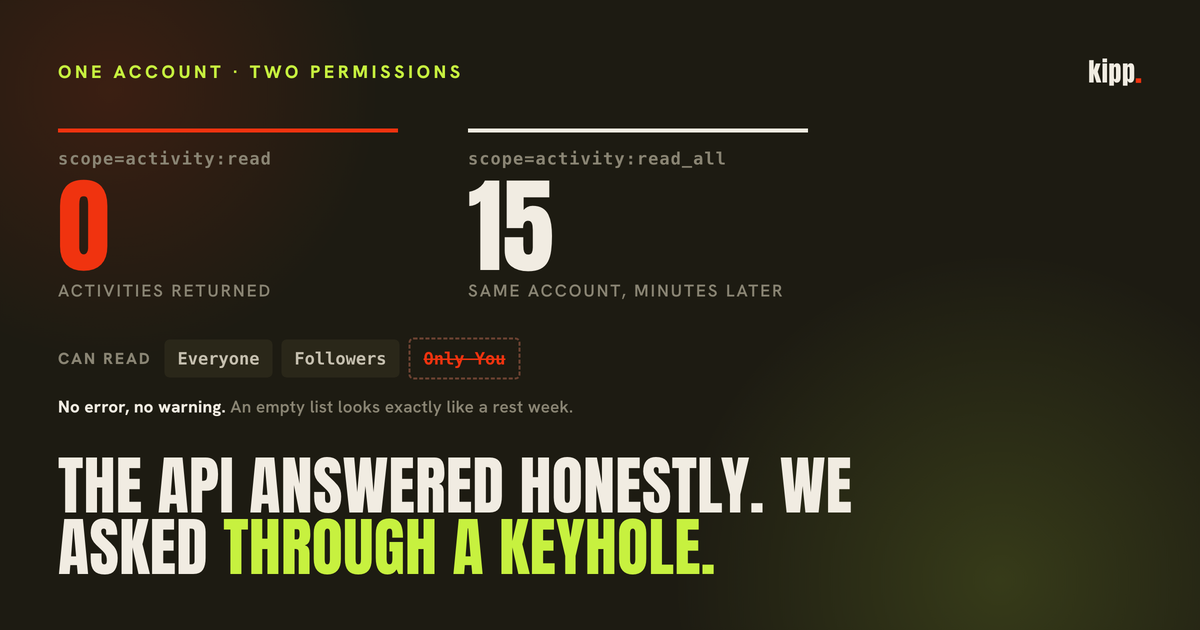
One athlete connected Strava. He had trained eleven times that month. Our server asked Strava for his activities and Strava answered, correctly and without an error, with an empty list.
Nothing in that exchange looked wrong. There was no failed request to retry, no permission error to surface, no red state anywhere in the app. The coaching layer read zero sessions, concluded he had not been training, and started rebuilding his plan from that premise.
The short answer
Strava has two activity read permissions. The narrow one,
activity:read, cannot see activities whose visibility is set to "Only You", and it does not tell you they exist. If your app was granted that scope, a private athlete's entire training history arrives as an empty list that is indistinguishable from a rest week. Reconnecting often does not fix it, because Strava skips the consent screen for apps you have already authorized.
Two scopes, one of them silent
Strava's authorization documentation defines both, and the wording is worth reading exactly rather than paraphrased.
activity:read grants the ability to "read the user's activity data for activities that are visible to Everyone and Followers, excluding privacy zone data".
activity:read_all grants "the same access as activity:read, plus privacy zone data and access to read the user's activities with visibility set to Only You".
So the difference is not a subset of fields or a rate limit. It is whether an entire category of your training exists as far as the connected app is concerned.
What makes it a trap rather than a documented limitation is the shape of the answer. An app with the narrow grant does not receive a partial list flagged as partial. It does not get a count of what was withheld. It gets a list, and the list is correct for the question that was actually asked. There is no field anywhere in the response that means "there is more here you are not allowed to see".
| What happened | What the app receives | What it looks like |
|---|---|---|
| Athlete trained 11 times, all private, narrow grant | [] | A rest month |
| Athlete trained 0 times, any grant | [] | A rest month |
| Athlete trained 11 times, all public, narrow grant | 11 activities | Correct |
The first two rows are the problem. They are byte-identical, and only one of them is true.
Where "Only You" actually comes from
This is the part we had wrong, in a comment sitting in our own source code, and it is worth correcting properly because the wrong version is repeated widely.
Our code says that "Only You" is "Strava's default for many athletes, and for anything synced from a Garmin". Both halves of that overstate it.
Strava documents the Activities privacy default for a newly created account as Everyone, alongside Profile, Group Activities and Mentions. The exception is accounts belonging to under-18s, which receive different defaults. So a fresh Strava account is public by default, not private.
And Garmin Connect exposes no privacy control at all over what it pushes to Strava. There is no per-activity or per-type toggle on the Garmin side. The visibility is applied by Strava, from your Strava account's own default Activities setting, which the help centre describes as "the setting used on any new activities uploaded to your account" and which does not retroactively change past activities.
So the accurate mechanism is simpler than the folklore, and slightly less comforting: it is one setting in your Strava privacy controls, chosen by you, applied to everything that arrives from anywhere. Athletes who set it to "Only You" tend to do so once, early, for reasons that have nothing to do with API access, and then forget about it entirely.
There is one genuine edge worth knowing. Strava documents a fail-safe: there is "a limited circumstance that can result in Strava saving your activities with the most private setting (Only You) when our server is unable to read your default privacy setting", and it defaults to private to protect the member. So individual activities can land private on an account whose default is public. An account default of Everyone therefore reduces this problem rather than eliminating it, which is an inference from that documented behaviour rather than something we have measured.
The reconnect that does nothing
If you have hit this and been told to disconnect and reconnect, there is a reasonable chance that advice did nothing at all, and the reason is a single parameter you never see.
Strava's authorization endpoint takes approval_prompt. Set to force, it "will always show the authorization prompt even if the user has already authorized the current application". The default is auto.
Under auto, an athlete who has previously approved an app is bounced straight back to it. No consent screen. No permission list. The flow completes in under a second and looks exactly like a successful reconnection, and the app receives the grant it already had.
Which means an app that fixes its scope request and asks its users to reconnect can ship a fix that changes nothing for every existing user, while appearing to work for all of them. The old narrow grant survives, silently, and the only observable symptom is the empty list that was already there.
This is fixable only by the app, by passing approval_prompt=force. It is not a setting you can reach from your side.
The granted scope is not the requested scope
The other half of getting this right is that an app must never assume it received what it asked for.
Strava returns the granted permissions on the redirect back to the app, and its documentation is explicit about why that matters: it is "a space-delimited list of scopes granted. This may differ from the originally-requested list if the athlete unchecked any of the requested scopes on the Authorization page."
That consent screen has individual checkboxes. An athlete who unticks the private-activity permission, quite reasonably, produces exactly the failure described above, on an app that requested the wide scope and did everything right.
So the correct behaviour is to store what was granted and read the empty list through it: if the grant is narrow, an empty activity list means we are not permitted to look, and the athlete should be told that rather than told they did not train.
Here the documentation and the behaviour part company, in a way that is easy to get wrong in both directions.
Strava documents the returned scope as space-delimited. Every grant we hold is comma-delimited. All seven stored grants on our application read read,activity:read_all, taken verbatim from the redirect parameter with no reformatting on our side. That is 7 of 7 on one application, so treat it as an observation about how this behaves today rather than a documented contract.
That leaves two ways to parse it wrongly, on either side of the correct answer:
- Follow the documentation. Split the string on spaces and you get one token,
"read,activity:read_all", which matches neither scope name. An exact-match check concludes the athlete did not grant private access, and the app tells a correctly-connected user to reconnect, permanently. - Reach for a substring check. Test whether the scope contains
read_alland you will match"activity:read,profile:read_all", which grants full profile access and only public activities. The app concludes it can see everything and reports a private athlete's empty month as a rest month, which is the original bug wearing a fix.
The parse has to split on the delimiter that is actually sent and compare whole tokens. Our regression test pins both traps, the space-delimited miss and the substring false positive, because both of them look correct in review.
One more observation from the same seven grants, in the opposite direction: we request activity:read_all alone and are handed back read,activity:read_all. The set that comes back is wider than the set requested. The general rule survives either way, which is that the request tells you nothing and only the response counts.
The damage was not the missing data
The eleven-activity month was found by hand, by someone comparing what he could see in Strava against what the app was saying to him. Nothing had alerted anyone.
Reconnecting that same athlete with the wide scope returned 15 activities where the previous grant had returned zero. One account, so that is the mechanism demonstrated rather than a rate.
The reason it went unnoticed for as long as it did is that every downstream consequence was plausible. A coach that believes you have not trained does not throw an error. It writes you a sensible plan for someone returning from a layoff. It grades your session-count habit against zero and reports a miss. It asks how the week went in a tone appropriate to a week that did not happen. Every one of those outputs is well-formed, internally consistent and wrong, and none of them reads as a bug to the person receiving it. They read as an app that does not understand them.
That is a harder failure to catch than a crash, because nobody files a report saying their app thinks they are doing less than they are. They conclude it does not work and stop opening it.
What we changed, beyond widening the request, was to stop letting an empty list speak for itself. The granted scope is stored at connection time, and when it is narrow the coaching layer is told, in as many words, that an empty Strava history means we cannot see it rather than that the athlete did not train, and to ask for a reconnection instead of reporting zero sessions.
Currently 7 of 7 grants on our application hold the wide scope, and none of the seven athletes unticked the permission on the consent screen. That is a small sample and it is not evidence that unticking is rare, only that it has not happened to us yet. The stored-scope check exists for the first time it does.
The general rule this belongs to, which we arrived at separately when Strava stopped reporting calories for gym sessions: a zero from a connected source is suspect until proven. An integration that is permitted to see nothing and an athlete who did nothing produce the same empty array, and the difference has to be carried explicitly, because it cannot be recovered later.
What to do
- Check your Strava default first. Settings, Privacy Controls, Activities. If it is set to "Only You", that is almost certainly the cause, and it applies to everything uploaded from any device.
- Know that changing it is not retroactive. Switching the default to Everyone affects future uploads only. Existing private activities stay private and stay invisible to a narrow grant, so a fix today does not backfill last month.
- Do not bother reconnecting until you know the app asks for the wide scope. If the app never passes
approval_prompt=force, a reconnect can complete without showing you a consent screen and hand back the same permission you already had. - Read the consent screen when you do get one. The permissions are individually tickable, and the private-activity one is the difference between the app seeing your training and seeing none of it.
- Treat a zero-session week from any connected source as a bug report. Especially if you know you trained. This class of failure is silent by construction, and you are the only person in the loop who knows the ground truth.
- Check Garmin's side only after ruling out Strava's. Garmin has no privacy control over the upload, so if activities are reaching Strava at all, the visibility decision was made by your Strava settings.
The API was never wrong. It answered the question it was asked, precisely, and the question was narrower than anyone realised.
Kipp reads your training from Apple Health, Garmin, Strava, Whoop and Oura. When a connected source returns nothing it can prove, it says so instead of counting it as a rest day.
Sources
- Authentication, Strava developers - the scope definitions,
approval_prompt, and the granted-scope parameter on the redirect - Your Privacy Defaults When You Create a Strava Account, Strava Help Center - Activities defaults to Everyone, and the under-18 exception
- Activity Privacy Controls, Strava Help Center - the default applies to future uploads only, and the Only You fail-safe
- Privacy Controls, Strava Help Center - where the Activities default lives
- Garmin and Strava, Strava Help Center - the auto-upload connection and what it does not control
- Sync with Strava but do not automatically share activities, Garmin Forums - confirmation that the privacy setting is Strava-side