Your watch records 45 minutes of strength training. The session appears in your activity history, but the squat chart stays empty. In our data model, those two screens can both be behaving exactly as written.
The 45 minutes are an illustrative workout, not a roster measurement. A session summary says that strength training happened. The progression calculation asks which exercise you performed, how much you lifted and how many repetitions you completed. Our imported summary does not contain those fields.
The short answer
A strength workout can sync successfully without supplying any lift data. Our connector record carries the session type and measured summary fields, while our strength calculation reads separately logged exercise sets. To calculate squat progress it needs positive load and repetitions for the same named lift on at least two distinct dates. A workout label, duration or calorie total cannot fill that gap.
What reached the app, and what the chart needs
Apple's HKWorkout documentation describes the workout object and associated samples. It does not establish what every third-party app imports from it. For that question, we inspected our receiving model rather than attributing its limits to the watch.
Our imported activity record carries a source, workout type, calories, dates and optional duration, average heart rate and distance. It contains no squat or bench sets. Separately logged exercises can be attached to that same session. That is the distinction behind the empty chart.
| Record | Enough to show the session? | Enough for our squat calculation? |
|---|---|---|
| Strength label and duration | Yes, in the activity pipeline | No load or repetitions |
| Summary with calories and heart rate | Yes | Still no load or repetitions |
| Named squat with load and repetitions | Can be logged as training | One usable observation |
| Named squat on two distinct dates | Can be logged as training | Enough for the server to calculate a change |
This is a description of our imported records and strength calculation. A specialist lifting app may hold richer records. Seeing sets in that app is not evidence that the downstream coach received them.
We gave the calculation the missing fields
We checked two synthetic workout records with our strength calculation. With no exercises logged, it produced no progression. With Squat logged as 100 kg for five repetitions on one date and 105 kg for five on another, it returned a progression.
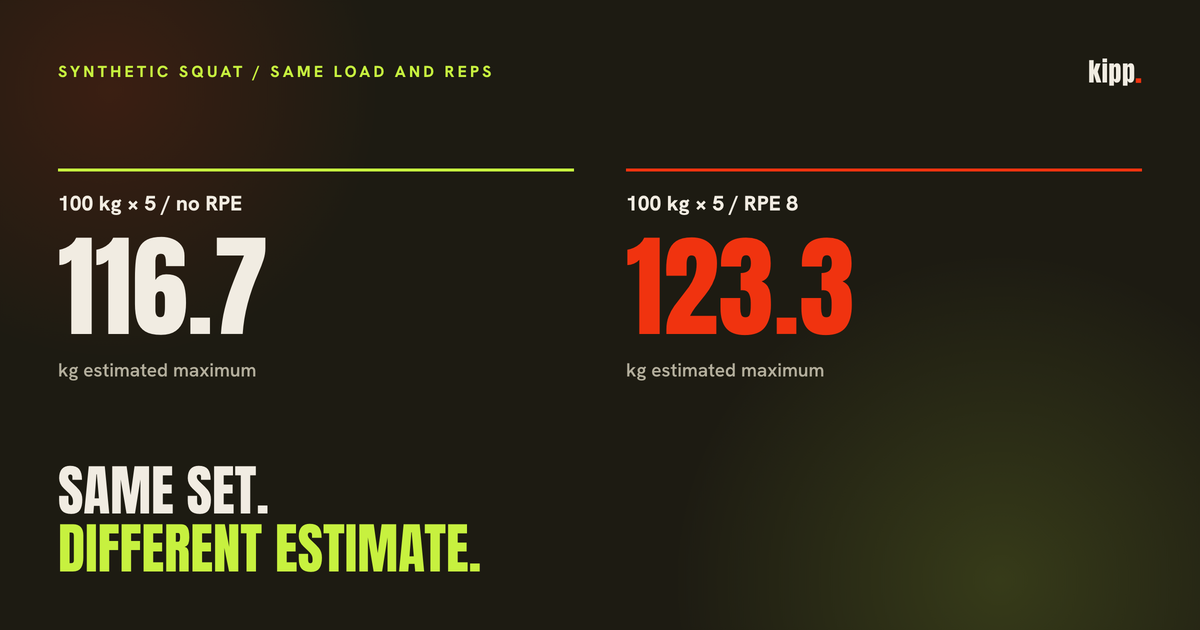
The implementation uses weight x (1 + effective reps / 30). With no effort adjustment, the estimates are 116.7 kg and 122.5 kg after rounding. The returned change is 5.8 kg, or 5.0% after the calculation's rounding.
Those are two constructed sets, not evidence that an athlete gained 5% strength between sessions. The observed quantities in a real log would be the load and repetitions. The maximum is a model output. The mobile display can also impose stricter requirements than this server calculation; two dated sets are not a promise that every screen will headline a trend.
The same set can produce a different estimate
Enter RPE 8 for the 100 kg set of five and our estimate adds two repetitions in reserve: 10 - 8 = 2. Effective repetitions become seven, and the estimate becomes 123.3 kg. The bar and the completed repetitions have not changed.
That is a computed illustration of how our model treats effort, not a validation of the estimate's accuracy. It explains why correcting an effort entry can move a chart without a new workout. The function also caps effective repetitions at 15. That ceiling limits the arithmetic; it does not turn the estimate into a measured maximum.
If you compare estimates, compare the input conventions too. An unrecorded effort score and a recorded RPE 8 are different inputs here. The practical inference is that inconsistent effort logging can make a progression look larger or smaller; this example does not estimate how often that happens.
Names and dates matter after the sets arrive
The app ignores differences in capitalisation, punctuation and spacing when grouping exercise names. It does not automatically treat different names as the same lift in this calculation. Back squat and Squat therefore remain separate unless the names are reconciled when logging.
It then keeps the highest estimated maximum for each named lift on each date. Two entries on the same date do not create two dated observations. That is appropriate to the specific daily series this function builds, but it is worth checking before deciding a second session failed to sync.
A missing chart can therefore have several concrete explanations: no sets reached the app, a set lacks load or repetitions, names split the history, or the calculation has only one date. None is established by the fact that the watch recorded a workout successfully.
Check one lift all the way through
Pick one squat session and open the receiving app's detail. Look for the exercise name, load and repetitions that you actually logged. If you only see time and calories, the missing step is set-level data, so reconnecting the same summary feed may not change the chart.
If the sets are present, compare the exercise name and date with the earlier session. Then inspect whether the displayed maximum uses an effort adjustment. Keep the actual set beside the estimate so a model change remains distinguishable from a heavier lift. Our article on squat stalls alongside running starts from that same requirement for a checkable lift history.
Kipp can combine a wearable session with separately logged sets. Its strength read depends on those sets, so an imported strength workout alone should never be presented as measured progress on a lift.
Sources
- Apple: HKWorkout, the workout object and its associated samples. Cited as documentation, not as evidence of what every app exports.