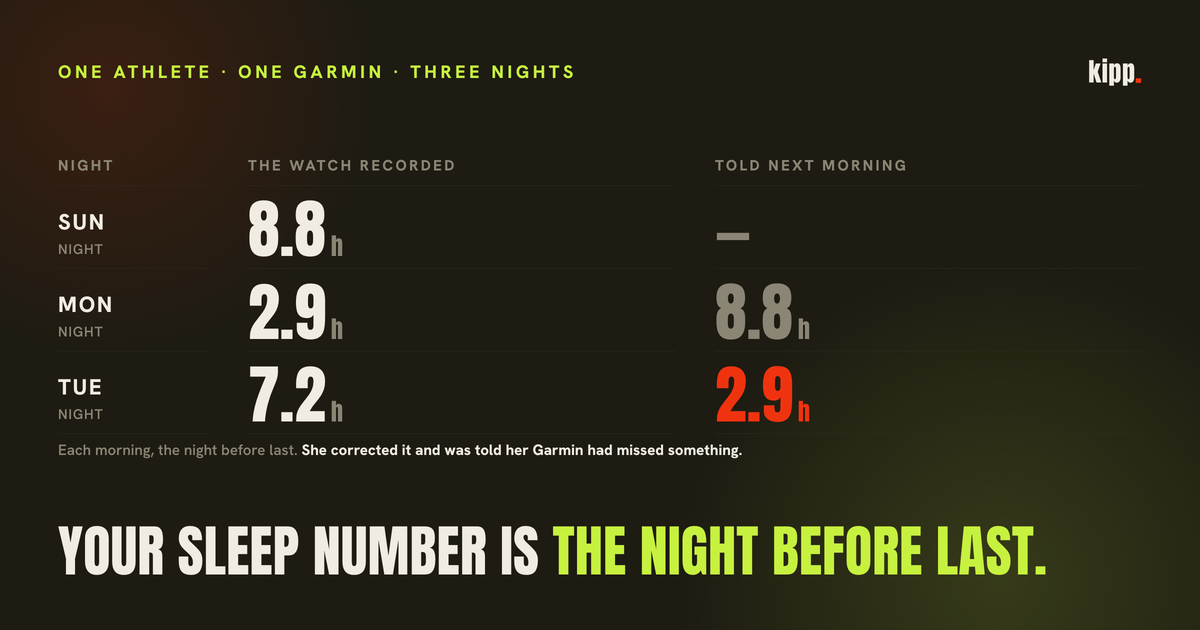
On a Tuesday morning in September a Garmin owner opened her coaching app and was told she had "got a decent 8.8 hours". That evening the conversation turned to her energy, the coach noted that Garmin showed 2.9 hours for the night before, and she confirmed it: 2.9 was right. Wednesday morning the check-in opened with "2.9 hours of sleep is a number I can't coach around". She replied, with a smiley, that it had not been 2.9 last night, it had been 7.2.
She was right both times, and so was her watch. The 2.9 was Monday night, and the 8.8, as far as the logs let us reconstruct, was Sunday's. Each morning she was being told about the night before last, and the app had no idea it was doing so. The coach's reply to her correction was that her Garmin had "clearly missed something". It had not. She did not write again, and cancelled on the fourth day.
The short answer
"Last night" is not a field in Apple Health. It is a window the app draws, and if the window is a trailing one, wide enough to hold a whole night, it still contains the previous night until the new one has been written. A watch's sleep reaches Apple Health only after the watch has synced to its own app and that app has written the sample, which can be hours after you wake. Until then, an app reading the window finds the older night and may call it last night. The number is real; the date is wrong. The honest fix is to keep only sleep that ended after local midnight today, and to show nothing when nothing has landed.
How a night gets to your app
Apple's own documentation is clear about what HealthKit stores and what it leaves to you. Sleep is a category sample with a start and an end. "Each sleep analysis sample can have only one value", and to record both time in bed and the stages within it, an app writes "samples with overlapping times". Then the line that matters: "By comparing the start and end times of these samples, apps can calculate secondary statistics." The total, the latency, the number of wakings and, above all, which samples belong to which night, are the reading app's arithmetic.
For a Garmin, the samples get there in stages. The watch records the night. It syncs to the Garmin Connect app on the phone, on open or in the background. Garmin Connect, if you have turned on sharing, writes the sleep to Apple Health; Garmin's support page on sharing data with Apple Health covers the setting, and a later Garmin Connect update (v4.71) added sleep stages to what it writes. The timing of that last step is not on a schedule you control. On a morning where you glance at your phone at 06:30 and the Connect app has not run, Apple Health contains everything up to yesterday morning and nothing since.
None of that is a defect. It is how a chain of three apps works. The defect was ours, in the fourth.
What our app was doing
Our morning read pulled recovery from Apple Health over a trailing 36-hour window. The comment in the code said "last ~36h (last night)". Thirty-six hours is a sensible width if you want to be sure of catching a night that started at 21:00 or at 01:00. It is also wide enough to hold the previous night in full: at 07:00 on Wednesday the window opens at 19:00 on Monday, and a short Monday night sits inside it whole.
So the read did the honest thing with what it had. It took every sleep sample in the window, merged the overlapping stage records into one span, and reported the total. On a morning where Tuesday night had already been written, that total was Tuesday night. On a morning where it had not, the only night in the window was Monday's, and the total was Monday's. The app had no way to tell which morning it was in, because it had never asked when the sleep ended.
That is the mechanism behind both of her mornings. Tuesday at 07:00 her window held Sunday night, 8.8 hours; Monday night's 2.9 had not landed. Wednesday at 07:00 the window held Monday night, 2.9 hours; Tuesday night's 7.2 had not landed. The figures were correct to the decimal and each was one night out of date.
Why the safety check did not catch it
We had already built a check for exactly this shape. Our earlier piece on a morning read that is not finished describes a signature for a carried-forward read: today's HRV and today's sleep both identical to yesterday's. Two real nights do not do that. Across the consecutive-day pairs on our roster at the time, HRV alone repeated 4.6% of the time and sleep alone 3.7%, but the two together almost never.
Her Wednesday read slipped past it by one millisecond. The sleep figure was exactly Monday's, 2.9. Her HRV was 39 against Monday's 40. The check required both to match, saw 39 is not 40, and stayed silent.
The reason is the same window. The sleep total is a merge over a whole night's samples, so if it is re-read it is re-read exactly. HRV, in our read, is the most recent sample in the window. Morning samples land on the phone as the day starts, so the HRV figure drifts by a millisecond or two on a morning where the sleep has not moved at all. The signature was right about the sleep and too strict about the HRV.
We re-counted over every consecutive-day pair in the table, 390 of them by then. Fifteen pairs shared a sleep value. Three of those also shared HRV exactly. No further pair appeared until the HRV gap reached 3 milliseconds. So the check now tolerates a drift of 2: it admits every carried-forward read we have observed and adds no false positives on nights that had settled. It should not be widened without re-running that count.
Two fixes, at two speeds
The server-side tolerance reached every athlete with the next deploy. It is a backstop: it flags a read as provisional, tells the coach not to grade the day on it, and has it ask how the night actually went. It does not make the number right.
The real fix is in the phone app, and it is one function. Instead of a trailing window, it keeps only the sleep samples that end after local midnight of the current day. Last night, whatever time it started, ends this morning. The night before ended yesterday morning and is excluded. An afternoon nap yesterday is excluded, because it is not last night. If nothing has landed yet, the function returns nothing, and the app writes no sleep figure for the day rather than a carried-forward one.
It drops one legitimate shape, and we would rather say so than pretend otherwise: a complete night that ended before midnight, a shift worker asleep from 14:00 to 22:00, reads as "no sleep yet", and the coach asks. That is a strictly better failure than confidently reciting the wrong night to someone whose whole intake had been about being tired.
Because it is client code, it ships with a build, and the athlete it was written for had already left. The server change is what reaches everyone in the meantime.
The part that did the damage
The wrong number was survivable. She corrected it in one line. What ended the conversation was the reply, which took her correction and blamed the device: "Garmin clearly missed something."
The app had misfiled a night and then, told so, accused the one component in the chain that had done its job. Our coach now carries a rule for this, written the same day: a corrected recovery figure is the read, and a guess that blames the athlete's hardware for our own lag is not allowed. We replayed her actual correction through the real coaching turn six times with the rule in place: the coach took her 7.2 as the read six of six times and blamed the device none. The baseline is the one reply production actually sent, which did. Six samples on one athlete's morning. It measures our coach against her, not the problem in general.
What to do on a morning that looks off
- If the sleep figure equals yesterday's to the decimal, it is yesterday. On our data that happens by chance in about 4% of consecutive nights. If the HRV is also within a couple of milliseconds of yesterday's, treat the whole read as a carry-forward.
- Open the watch's own app first. For a Garmin that is Garmin Connect; let it sync, let it write to Apple Health, then read. The chain has three steps and the third one is the one that waits for you.
- Compare the end time, not the total. In the Health app, a sleep sample shows when it ended. If the most recent one ended yesterday morning, last night is not there yet, whatever any other app is displaying.
- Correct it and expect the correction to stick. How you slept is real data. An app that answers a correction by doubting your device has the chain backwards.
The watch recorded three nights correctly. The phone app carried two of them a day forward. We have fixed the window, added the tolerance, and taken the blame out of the reply, in that order of how much they mattered.
Kipp now reads last night as the sleep that ended after midnight, and says nothing when it has not arrived. If a read is still yesterday's, the coach is told so before it speaks, asks how you slept instead of grading a number that is not yours, and treats your answer as the read.
Sources
- HealthKit's sleep model: one value per sample, overlapping samples for in-bed and stages, and "by comparing the start and end times of these samples, apps can calculate secondary statistics." Apple Developer Documentation: HKCategoryValueSleepAnalysis
- Garmin's setup and behaviour for writing Connect data to Apple Health, cited by title (Garmin's support pages refuse automated fetching, so nothing here is quoted from them). Garmin Support: Sharing Your Garmin Connect Data With Apple Health, Garmin Support: Garmin Sleep Tracking
- Garmin Connect's iOS update adding sleep stages to what it shares with Apple Health. Notebookcheck, on Garmin Connect v4.71
- The server-side half of the same problem, a daily record created at midnight with the previous night in it, and the original carried-forward signature. Your morning recovery read is not finished yet
- The athlete's three nights, the 36-hour window, the 390-pair recount and the six-sample coaching check are from our own code, logs and roster data in September 2026. One athlete and one small live test; none of it is a population claim.