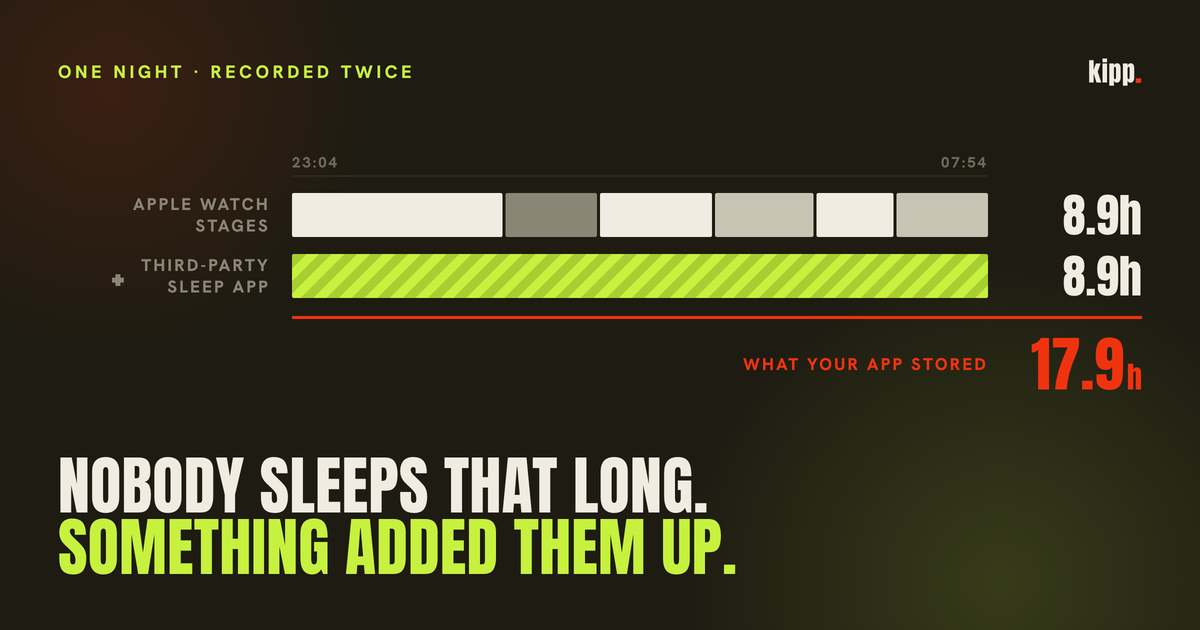
Three nights in our database read 17.9 hours, 15.9 hours and 12.9 hours. The athlete they belong to sleeps a normal amount, owns one watch, and had done nothing unusual on any of those dates.
Each figure sits close to exactly double a plausible night, and that ratio is the whole diagnosis. Nobody's sleep tracking degrades by a factor of two. Something counted the same hours twice.
The short answer
You did not sleep 15 hours. Two sources recorded the same night into Apple Health, and something downstream added their durations together instead of overlaying them. Open Health, tap your profile picture, then Apps and Services, and check how many apps can write Sleep.
That fixes the symptom in about thirty seconds. The rest of this is why the mistake is so easy to make, why Apple has decided it is not their problem to solve, and where the damage actually shows up, which is not in the number you noticed.
"Apple Health" is two different things
Worth separating before anything else, because it explains why two apps can disagree about the same night and neither is broken.
There is the Health app, the thing with the icon. And there is HealthKit, the database underneath it that every other app reads from and writes to.
The Health app applies a source priority order when it displays a value. In Sleep, under Data Sources and Access, whatever sits at the top of the list takes priority, and newly installed apps are placed at the top automatically. So the Health app usually shows you one source rather than a total, which is exactly why a duplication problem can sit in your data for months without the Health app ever looking wrong.
An app reading through the HealthKit API gets no such courtesy. It receives every sample from every source, overlapping or not, and has to work out what to do with them.
So when a third-party app tells you that you slept fifteen hours and the Health app says 7.4, neither is necessarily miscounting. They are answering different questions about the same pile of samples. (Community reports suggest the Health app's priority ordering resolves inconsistently for sleep specifically. We have not verified Apple's display logic ourselves, so treat that as a report rather than a finding.)
The overlap is deliberate, and Apple documents it
This is the part that makes the bug so inviting. Overlapping sleep samples are not corruption. They are the design.
Apple's documentation for the sleep analysis category is direct about it:
"Each sleep analysis sample can have only one value. To track both the amount of time a person spends in bed and the quality and quantity of their sleep, use samples with overlapping times."
A single sample cannot say in bed and in REM simultaneously, so HealthKit expresses that with two samples covering the same clock time. One long in-bed sample, and a finer set of stage samples layered over it:
"One set of samples tracks the amount of time the user spent in bed. Then, you can partition the in-bed time into a more-detailed set of samples. These detailed samples show when the user was awake, in core sleep, in deep sleep, or in rapid eye movement (REM) sleep. The detailed samples overlap the in-bed sample, but they don't overlap each other."
Read that last sentence again, because it is the one the bug hides behind.
The invariant that holds until a second app arrives
"The detailed samples overlap the in-bed sample, but they don't overlap each other."
If that holds, then adding up the durations of every asleep sample gives you the correct total. Core, deep and REM tile the night without gaps or double coverage, so a sum is a union. Write that code, test it against your own Apple Watch data, and it will be right every single time.
The invariant is real. It is just scoped to one writer.
An Apple Watch partitions a night cleanly. A third-party sleep app such as AutoSleep, Pillow or Sleep Cycle writes its own assessment of the same night, typically as one undifferentiated asleep block covering the whole session. Those two descriptions of one night do not partition anything. They sit on top of each other.
Now the sum is roughly the sum of two nights, and the code that was correct yesterday is silently wrong today, because the user installed an app. No error, no exception, no warning. Just a plausible-looking number that happens to be doubled.
That is what produced 17.9 hours.
Apple will not deduplicate this for you
It is reasonable to assume the platform handles this. It does not, and Apple has said so plainly.
In a developer forum thread from someone hitting exactly this problem, an Apple engineer answered:
"if your device contains overlapping in bed intervals from multiple source then that's what the query will return. It will be up to you to decide how you want to handle it."
Their suggested approaches were to ignore certain sources, or to track the intervals yourself in some kind of data structure.
That is the correct engineering call. HealthKit cannot know whether your watch or your sleep app is the better authority for a given night, and quietly discarding one would be worse than returning both. But it does mean every app reading sleep from HealthKit is independently responsible for getting this right, and the failure is invisible when it gets it wrong.
The fix is small. Sort the asleep intervals by start time, merge any that touch or overlap, then total the merged spans. Ten lines. An interval union, never a sum.
That single change is the difference between 17.9 hours and 8.9.
Where the damage actually landed
If the story ended at a wrong number on a chart, it would be a footnote. It did not, and this is the part worth taking away.
An inflated sleep figure does not stop at being displayed. In our system, and in most systems like it, it is averaged into a personalised baseline - the athlete's own typical night, which later comparisons are graded against. Sleep is not judged against eight hours. It is judged against your number.
So a contaminated series does not produce one wrong day. It moves the bar that every subsequent day is measured with.
We found this the hard way, and the order matters. The first bug we caught was unrelated and simpler: the code computed the nightly average as total asleep hours divided by a hardcoded 28, the length of the window requested rather than the number of nights that actually had data. For someone with a dense record that is nearly correct. For a sparse tracker with ten nights in a 28-day window, it understates their average roughly threefold.
Two of the four athletes carrying a personalised sleep need had an impossible one: 2.7 hours and 1.3 hours.
A sleep need of 2.7 hours makes every night a runaway win. Including, on one specific morning, a 4.7-hour night that the same system had already flagged as that day's main problem. One surface correctly identified an athlete as underslept while another congratulated them, because the second was comparing against a baseline that arithmetic had destroyed.
Every sibling metric in that same function already averaged over days-with-data. Sleep alone did not.
Then, while checking whether the damaged baselines could simply be recomputed from stored history, we found the second bug, which is the duplication one this article is about. The stored nights included 17.9, 15.9 and 12.9 hours, so recomputing from them would have replaced one wrong number with a different wrong number.
Two independent errors, in the same metric, and both flattered the athlete. That is not a coincidence worth ignoring. A number that makes users look good gets challenged by nobody, so it survives longer.
What we could not fix, and still have not
The repair cleared the corrupted baselines rather than recomputing them, because absence is a state every downstream surface already handles by omitting the comparison, while a confidently wrong number is not. Two were cleared, two were plausible and left alone. The correct value rebuilds from the device on the next read.
The raw nights are a different matter. The original HealthKit samples live on the phone, so a summed value already written to a server cannot be un-summed after the fact. Our backfill is existing-wins by design, which is right for not clobbering good data and means those rows will never self-heal.
They are still visible. A recovery card in our own app currently reports a 3.3-hour sleep average for one athlete and 10.9 hours for another, both from that contaminated window. Building better surfaces for sleep did not fix the data, it just gave the bad data more room to be seen. Closing it needs a deliberate re-backfill that we have not yet done.
There is a smaller lesson from the test suite that is worth stealing. Our regression test for this encoded the bug it was supposed to catch. The helper that built test sleep sessions anchored every sample to the same 07:00 wake time, so three supposed "stages" all overlapped, and the union correctly returned 3 hours where the test asserted 7. The test was wrong, not the code. Overlap and fragmentation are different properties and they now have separate tests.
How to check yours
- Look for the doubling ratio. Take a night you remember. If your app reports close to twice it, this is your problem and not a sensor issue. Sensor error looks like 30 minutes, not 100%.
- Open Health, your profile picture, then Apps and Services. Go through anything sleep-related and check what has permission to write Sleep. You are looking for two or more things that all think they own your nights.
- Pick one authority and turn off write access for the rest. Not read access, which is harmless. Write access is what puts a second copy of the night into the database.
- Check Data Sources and Access under Sleep for the priority order, and move your preferred source to the top. New apps go to the top automatically, which is how a working setup breaks without you touching it.
- Then check any app that reads your sleep, not only the Health app. The Health app's priority ordering can be masking a duplication that everything downstream is still summing.
How much to trust the number that is left
Once the total is honest, a fair question is how good it was to begin with.
In a 2024 study published in Sensors, 35 adults aged 20 to 50 without sleep disorders spent a single night under polysomnography alongside an Oura Ring Gen3, a Fitbit Sense 2 and an Apple Watch Series 8. For distinguishing sleep from wake, sensitivity was at or above 95% for all three. For discriminating between sleep stages, Apple Watch sensitivity ranged from 50.5% to 86.1% with precision from 72.7% to 87.8%, and the Oura Ring was the only device the authors reported as not differing from polysomnography across wake, light, deep and REM.
One night, 35 people, healthy adults. Not a large study, and not a claim about how these devices behave across a population or across a year.
The practical read: the total is roughly trustworthy, the stage breakdown is an estimate. Chase your total sleep time and your consistency. Do not restructure your training because your deep sleep percentage moved, since that is the number the hardware is least sure about.
And a total that is exactly double a real night is not a measurement at all. It is two apps talking over each other.
Kipp takes the union of your sleep intervals rather than the sum, so a night recorded by your watch and a sleep app counts once. It reads sleep alongside HRV, resting heart rate and what you actually trained, and when it has no honest reading it says so instead of comparing you against a baseline it cannot stand behind.
Sources
- Apple, HKCategoryValueSleepAnalysis, HealthKit documentation. The quoted passages on overlapping samples and the in-bed / stage partition are verbatim. developer.apple.com
- Apple Developer Forums thread 730258, How can I get non-overlapping sleep samples from HealthKit in Swift? The response quoted is from an Apple engineer in that thread. developer.apple.com/forums
- Accuracy of Three Commercial Wearable Devices for Sleep Tracking in Healthy Adults, Sensors, 2024, 24(20), 6532. 35 participants aged 20-50, single-night inpatient study against polysomnography. PubMed
- Apple Support documentation on Data Sources and Access describes the source priority order and that newly added apps are placed at the top of the list.
- The 17.9 / 15.9 / 12.9 hour nights, the 2.7 and 1.3 hour sleep needs, the 3.3 and 10.9 hour averages still on display, and the divide-by-window error are from our own data and codebase. Sample sizes are stated inline. They are small, and none of them is a population claim.